

I know exactly how suffocating it feels when a strict deadline is hours away and your bank account is empty. Maybe you are a sari-sari store owner needing immediate inventory capital to keep the lights on, or perhaps you are a student staring down a 5 PM tuition deadline with no traditional bank account to your name. When panic sets in, it is natural to look for an instant financial lifeline. You are not alone in this situation, and while borrowing money in a rush feels incredibly stressful, securing immediate funds directly to your mobile wallet is entirely possible if you understand the system’s exact rules. We will walk through the exact mechanics of getting the liquidity you need right now, safely and precisely.
Summary: Securing a fast online loan via gcash philippines or Maya requires using SEC-registered lending apps that support real-time InstaPay disbursements. Approvals can take minutes, but borrowers must ensure their e-wallets are Fully Verified to prevent incoming transfer blocks caused by basic tier transaction limits.
Key Takeaways: E-Wallet Loan Disbursement Comparison
| Lending Platform | Disbursement Method | Est. Time to Fund | E-Wallet Fee Deducted | Best For |
| GLoan | Direct to GCash | Instant | Zero | Active GCash users with high GScore |
| Maya Credit | Direct to Maya | Instant | Zero | Maya users needing revolving credit |
| Tala | InstaPay to GCash/Maya | 5 – 15 minutes | Php 15 – 25 | Unbanked users, fast eKYC |
| JuanHand | InstaPay / PESONet | 15 mins – 24 hrs | Varies | Smaller emergency amounts |
| BillEase | InstaPay to E-Wallets | Up to 1 hour | Php 15 – 25 | Larger limit cash loans |
Which Online Loan Apps Deposit Instantly to GCash or Maya?
To get cash instantly, you must use apps integrated with InstaPay for real-time e-wallet crediting, such as Tala, BillEase, or JuanHand. Avoid apps relying solely on PESONet, as PESONet transfers have daily cut-offs that can delay your funds until the next business day.
When you are unbanked, your GCash or Maya account acts as your primary financial hub. Over my years analyzing the Philippine lending sector, the most frequent point of failure I observe is a mismatch between the lending app’s payout gateway and the borrower’s expectation of speed. A true online loan philippines experience designed for emergencies will exclusively utilize InstaPay.
When our team tested the disbursement speeds of top-tier apps last month, we found a distinct separation in performance. Independent SEC-registered lenders that explicitly offer e-wallet payouts usually push the funds through a third-party payment gateway like Xendit or PayMongo. These gateways trigger an InstaPay transfer. As long as the transaction is under the Php 50,000 InstaPay limit, the money appears in your GCash or Maya app within minutes.
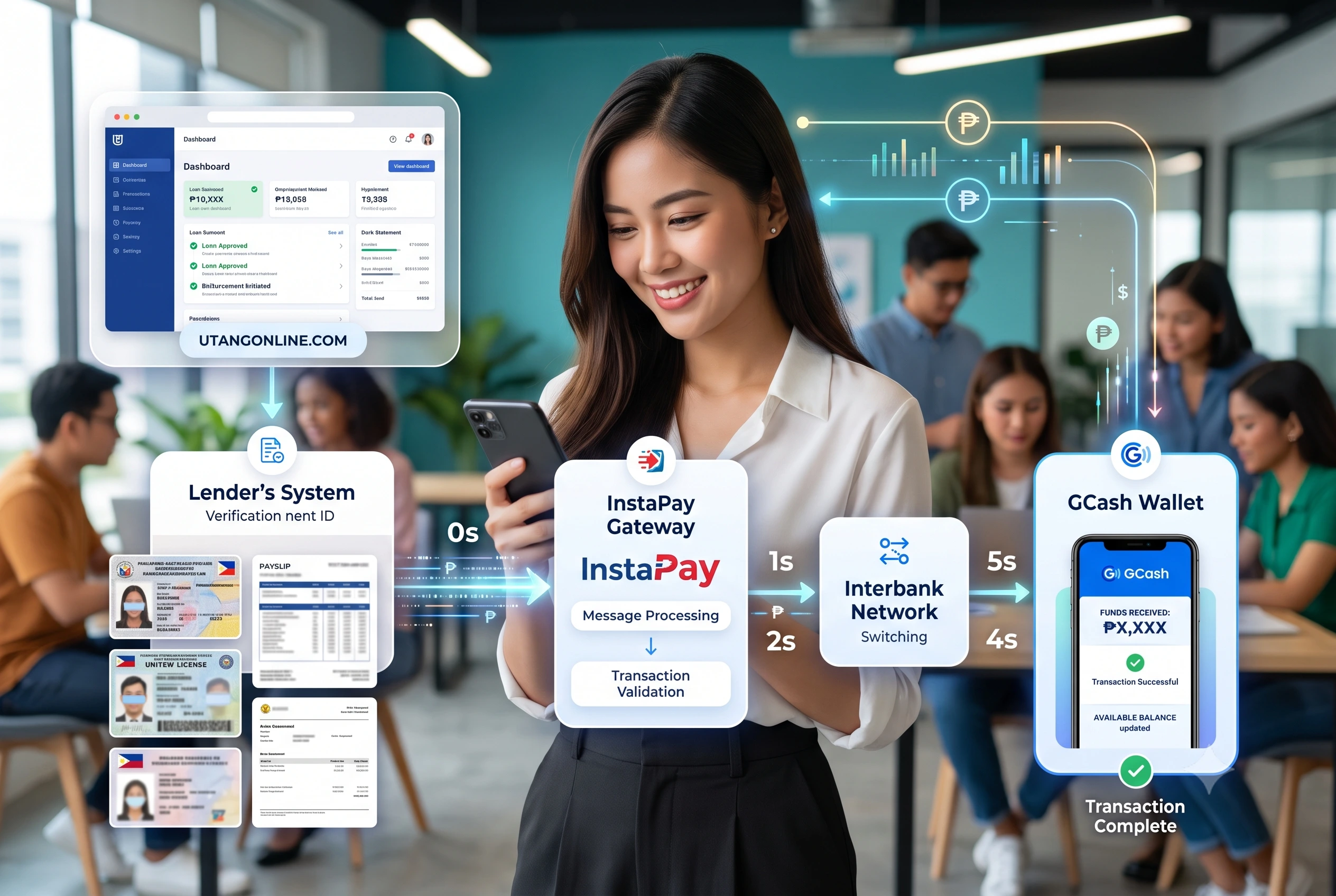
How Does GLoan Compare to Standalone Apps for Immediate GCash Funds?
GLoan is faster than standalone apps because it operates entirely within the GCash ecosystem, bypassing external clearing networks. If your GScore is eligible, disbursement is instantaneous and requires zero transfer fees, whereas standalone apps rely on external gateways.
If you already have a high GScore – usually built by consistently paying bills, cashing in, and using GCredit – GLoan is the path of least resistance. You do not need to download a separate application, upload new ID photos, or wait for an external underwriter to review your gig-economy income. The ecosystem already trusts you based on behavioral data. However, if your GScore is low or you lack a pre-approved credit line, you are forced to look at external standalone applications.
How Does Maya Credit Handle Instant Liquidity?
Maya Credit functions as a revolving virtual credit line rather than a lump-sum term loan. Once activated, funds can be instantly transferred to your Maya wallet balance at any time, making it ideal for micro-emergencies occurring outside banking hours.
During our hands-on evaluation of the Maya ecosystem, we noted that Maya uses strict internal data to assign credit limits. A student managing their daily allowance through Maya will quickly unlock a basic credit line. The distinct advantage here is that you only borrow exactly what you need at the exact moment you need it, rather than taking a Php 10,000 term loan just to cover a Php 2,000 emergency.
What Are the Real Friction Points When Receiving Loan Disbursements via E-Wallets?
The primary friction points are unverified e-wallet limits, faded ID cards failing automated eKYC, and unexpected InstaPay processing fees. Borrowers frequently experience stuck funds because their incoming GCash limit is capped at Php 50,000 for basic accounts.
The advertising surrounding instant digital lending often glosses over the harsh realities of mobile wallet mechanics. Lenders promise funds in two minutes, but they cannot control the receiving end of the transaction. If you are rushing to pay a hospital bill and apply for a Php 20,000 loan, the lender might approve you instantly. But if your receiving GCash account is not ready to handle that volume, you will face severe delays.
Can an Unverified GCash Account Block My Loan Disbursement?
Yes, an unverified or basic GCash account will block incoming loan disbursements if the amount exceeds your monthly incoming limit. You must upgrade to a Fully Verified tier to increase your wallet capacity to Php 100,000 or Php 500,000 before applying.
This is the exact scenario that traps desperate borrowers. Let us say you apply for a loan of Php 15,000. The lender approves it and initiates the transfer. If your GCash account is only partially verified, or if you have already hit your Php 50,000 incoming limit for the month due to sari-sari store transactions, the InstaPay transfer will bounce. The lender’s system will mark the funds as sent, your e-wallet will reject the deposit, and you will be stuck in customer service limbo for 3 to 5 business days while the systems reconcile the bounced transaction. Always check your wallet limits inside the GCash or Maya app profile section before signing a loan agreement.
How Do InstaPay Fees Eat into Your Approved Loan Amount?
Lenders often deduct a Php 15 to Php 25 InstaPay transfer fee directly from your approved principal. If you strictly need exactly Php 5,000 for a tuition payment, you must apply for slightly more to cover the disbursement deductions.
In our experience auditing loan contracts, borrowers frequently ignore the fine print regarding disbursement charges. Processing fees and gateway charges are deducted upfront. If a payment portal requires exactly Php 10,000 to clear your balance by 5 PM, receiving Php 9,650 because of upfront service and InstaPay fees will cause your payment to fail. You have to calculate your borrowing amount based on the net proceeds, not the gross principal.
How Can First-Time Borrowers Speed Up the eKYC Process?
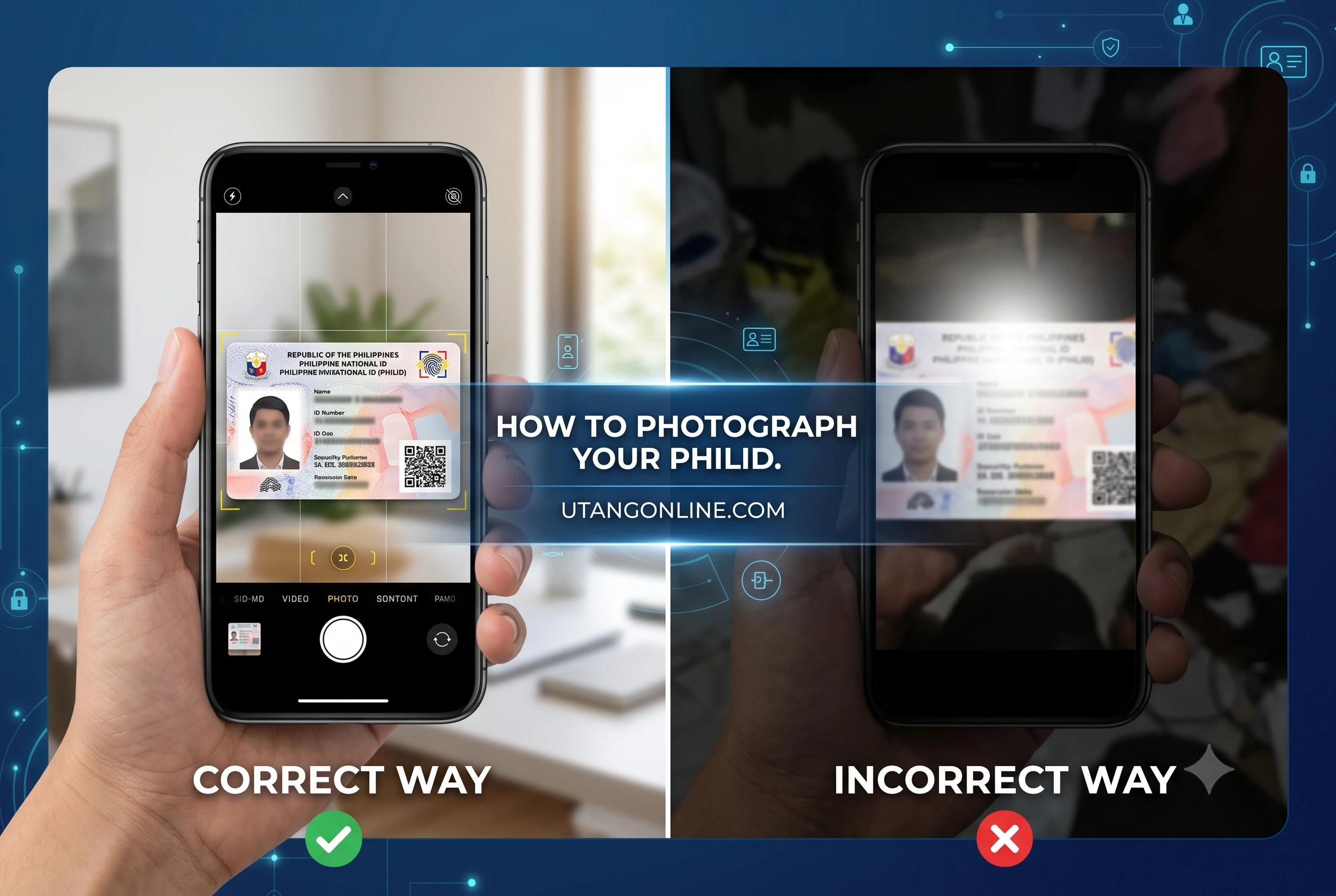
To accelerate eKYC, use a well-lit, non-reflective room to scan a primary ID like a Passport, Driver’s License, or National ID. Many platforms offer first time borrower promos with faster processing queues, provided your ID details match your application perfectly.
Know Your Customer (KYC) regulations dictated by the Bangko Sentral ng Pilipinas (BSP) mandate that lenders verify your identity. Since digital lenders do not have physical branches, they rely on optical character recognition (OCR) and biometric facial scanning. If you want your cash fast, you must make the machine’s job easy.
Why Do Automated Identity Checks Reject Valid Philippine IDs?
Automated systems reject valid IDs due to faded borders, holograms causing camera glare, or scratched barcodes. If the OCR fails to read your ID instantly, your application is pushed to a manual review queue, delaying your loan by 24 to 48 hours.
When our team tested the eKYC flows of several prominent apps, we noticed a recurring issue with older UMID cards and heavily worn Postal IDs. The software looks for specific anchor points on the card. If the plastic is scratched over your birthdate, the AI flags the application as a potential fraud risk. To avoid this, gently wipe your ID clean, place it on a dark, flat surface to create contrast, and ensure there is no direct overhead lighting reflecting off the plastic.
What Happens If My GCash Loan Disbursement Gets Stuck?
If a loan disbursement gets stuck, it is usually due to a temporary InstaPay network timeout between the lender’s bank and your e-wallet. Do not reapply; wait 24 hours as the funds will either credit to your wallet or bounce back to the lender.
Panic is the natural reaction when a loan contract is signed, the app says “Disbursed,” but your Maya or GCash balance remains zero. The absolute worst action you can take is immediately applying for a second loan from another app out of desperation. This leads to over-borrowing. Network timeouts happen, especially during mid-month and end-of-month paydays when the InstaPay system handles massive volume.
How to Track Missing PESONet or InstaPay Transfers?
To track missing funds, request the exact 12-digit InstaPay Trace Number or PESONet Reference Number from your lender’s customer service. You must provide this reference number to GCash or Maya support so they can locate the floating transaction.
Without that specific reference number, GCash customer support cannot help you. They cannot look up a transfer just by your name or the lender’s name. You must message the lending app’s support desk, state clearly that the funds did not arrive, and demand the transaction reference ID. Once you have that, file a ticket through the e-wallet’s help center.
How Should You Protect Yourself When Borrowing Fast Cash?
Always verify the lending app against the SEC’s official list of registered financing companies before providing personal data. Protect yourself by reading the Truth in Lending Act disclosure to understand the exact monthly interest rate and late penalty fees.
Desperation breeds vulnerability. When you need money immediately for an emergency, you are a prime target for unregistered, predatory loan sharks operating through social media or unverified APK downloads. These illegal operators will bypass standard InstaPay integrations, asking you to send money via personal remittance, and they will harvest your contacts to harass your family if you are late on a payment.
A legitimate, SEC-compliant digital lender will never ask for an upfront deposit before releasing your loan. They will provide a clear disclosure statement detailing every single fee. They will securely route your funds directly into your verified GCash or Maya account using official banking channels. Borrowing money online is a valid financial tool when used correctly and cautiously. Keep your e-wallets verified, understand your transaction limits, and only deal with transparent, regulated platforms.
References
- Securities and Exchange Commission PhilippinesOrganization: SEC PhilippinesResource: List of Registered Online Lending PlatformsURL: https://www.sec.gov.ph/lending-companies-and-financing-companies-2/list-of-registered-online-lending-platforms/
- Bangko Sentral ng PilipinasOrganization: BSPResource: National Retail Payment System (InstaPay and PESONet Guidelines)URL: https://www.bsp.gov.ph/SitePages/InclusiveFinance/NRPS.aspx
- GCash Help CenterOrganization: Globe Fintech Innovations, Inc.Resource: GCash Wallet Limits and VerificationURL: https://help.gcash.com/hc/en-us/articles/360017722733-What-are-my-Wallet-and-Transaction-Limits
- Maya SupportOrganization: Maya Philippines, Inc.Resource: Understanding Maya Account LimitsURL: https://support.maya.ph/s/article/What-are-my-account-limits
Last Updated on July 7, 2026 by Michael Reyes
